
Company Code Can't Be Taken Home—How to Continue Using ChatGPT Codex at Home? A Secure Solution That Doesn't Expose Public Ports
Company code must not be copied to personal computers, and SSH, RDP, or Codex services should not be directly exposed to the public internet. This article provides a solution for host execution and remote control: code, credentials, and toolchain remain on the company computer, while at home you only send commands, approve operations, and view diffs. It also explains the real data boundary, least-privilege settings, and acceptance methods.
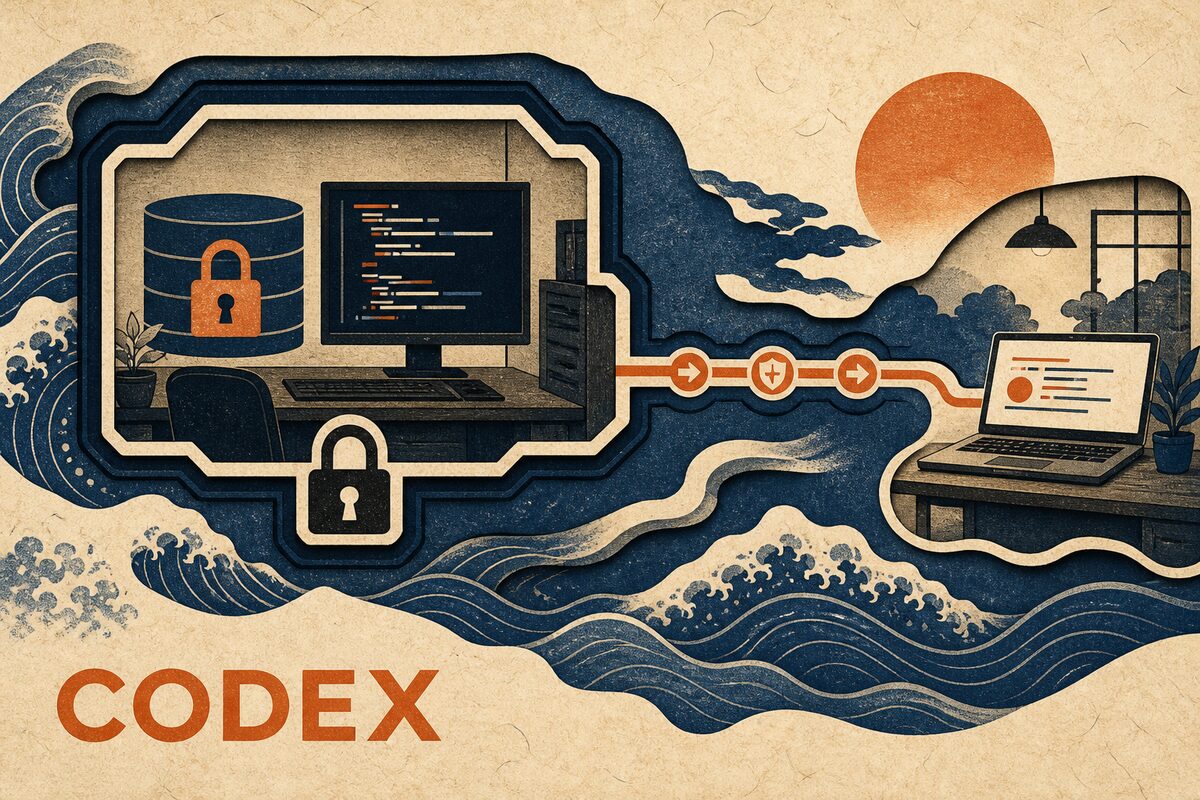
Yes, but only if the company allows remote development and the remote link is approved. The right approach is not to copy the repository to a personal computer, nor to open SSH, RDP, or Codex ports on the office network router, but to keep Codex running on the company computer: code, Git credentials, dependencies, and build environment stay in place, while the home computer or phone is only responsible for sending commands, handling approvals, viewing terminal output, and checking diffs.
This approach solves the problems of "not copying the complete codebase home" and "the company host not accepting public inbound connections." It does not mean "no data ever leaves the company": Codex still sends prompts and the context needed to complete tasks to the company-approved model service; for the remote client to display the session, messages, status, diffs, and approvals must also traverse the remote link. If the company prohibits external models, third-party relays, or personal device access, you cannot bypass the rules with technical means; you should continue using the company-provided VPN, VDI, or managed development environment.
The date for information and product capability verification is August 21, 2026. OpenAI has made continuing Codex tasks from the ChatGPT mobile app an official remote scenario and stated that its remote link works through a secure relay, without needing to expose the host directly to the public internet; the specific available entry points still depend on the current account and the Remote feature actually shown in the app. This article further provides PandaNpc implementation methods suitable for existing Codex CLI, Windows, macOS, and Linux hosts.
First, Be Clear: Regular ChatGPT and Remote Codex Are Not the Same Thing
Regular ChatGPT conversations are already in the cloud; after going home, you can continue by logging into the same account—there is no "connecting to the company computer" issue. What really needs remote access is Codex, which can read local projects, run Shell, modify files, and call development tools.
In Work with Codex from anywhere, OpenAI explains that remote Codex files, credentials, permissions, and the local development environment remain on the machine running Codex, while the mobile app receives terminal output, diffs, test results, and approvals. The current ChatGPT Work and Codex help documentation also states that the mobile app accesses supported remote Codex sessions through the Remote tab, rather than directly opening company disks in a regular chat.
If your Codex App already shows the official Remote and your company's ChatGPT workspace allows it, prioritize the official solution. If you need to control the Codex CLI already installed on the company computer, the host is Linux, or you want to enter uniformly from a browser, iOS, and another desktop computer, you can use the PandaPaw host solution below. Both follow the same security principle: execution stays on the host, and the remote side only performs authenticated control.
Among Four Approaches, Which Ones Are Truly Suitable for Company Code
| Approach | Is code copied home? | Requires public inbound? | Recommendation |
|---|---|---|---|
| Copy the Git repository to a personal computer | Yes | No | Not recommended; may violate source code, credential, and data management rules |
| Directly open SSH, RDP, or local Agent ports | No | Yes | Not recommended; increases the public attack surface and requires maintaining brute-force protection, patches, and audit yourself |
| Company-approved VPN, VDI, or bastion host | No | Usually managed by the company | If the company already has a standard solution, prioritize it |
| Approved Agent secure relay | No; the full repository stays on the host | No | Suitable for scenarios that only need to continue Codex sessions, approvals, and view results |
"Not opening public ports" does not mean "magically connect after turning off the firewall." It means the company host and the remote client both actively establish outbound HTTPS/WebSocket connections, and an authenticated relay matches the sessions, so no public IP, router port forwarding, or an SSH service open to the internet is needed. Strict office networks may still require an administrator to allow the corresponding outbound domains and WebSocket traffic.
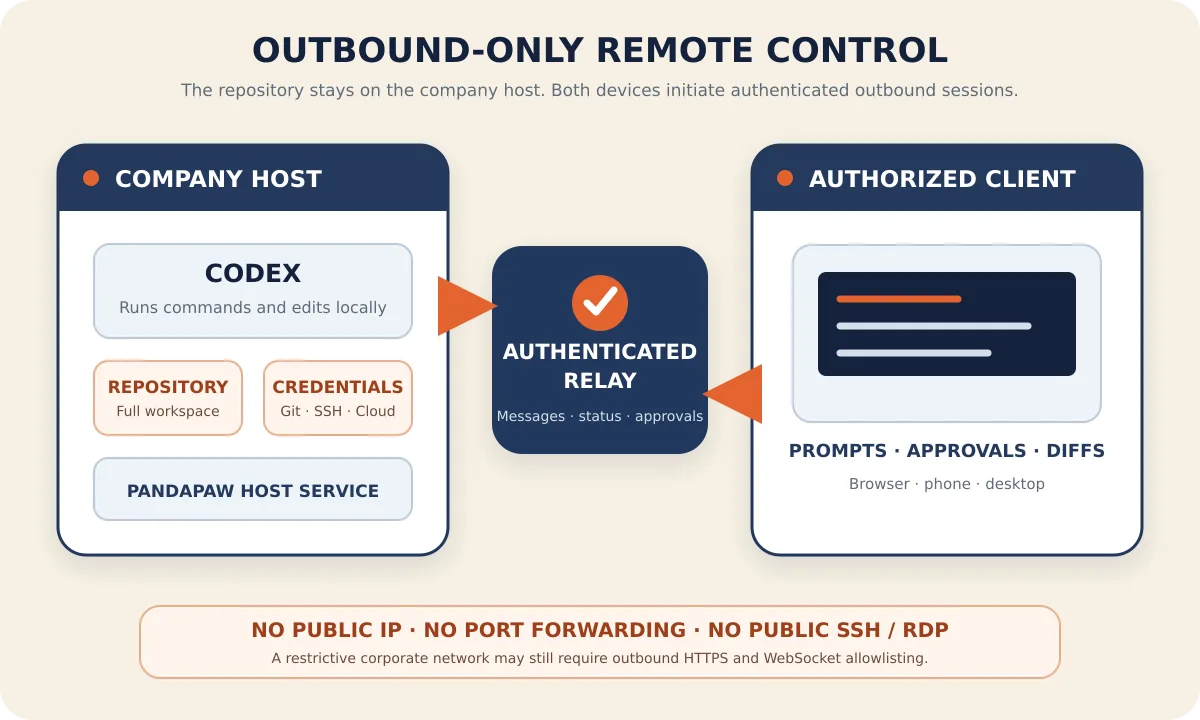
Where Is the Data Boundary of This Solution?
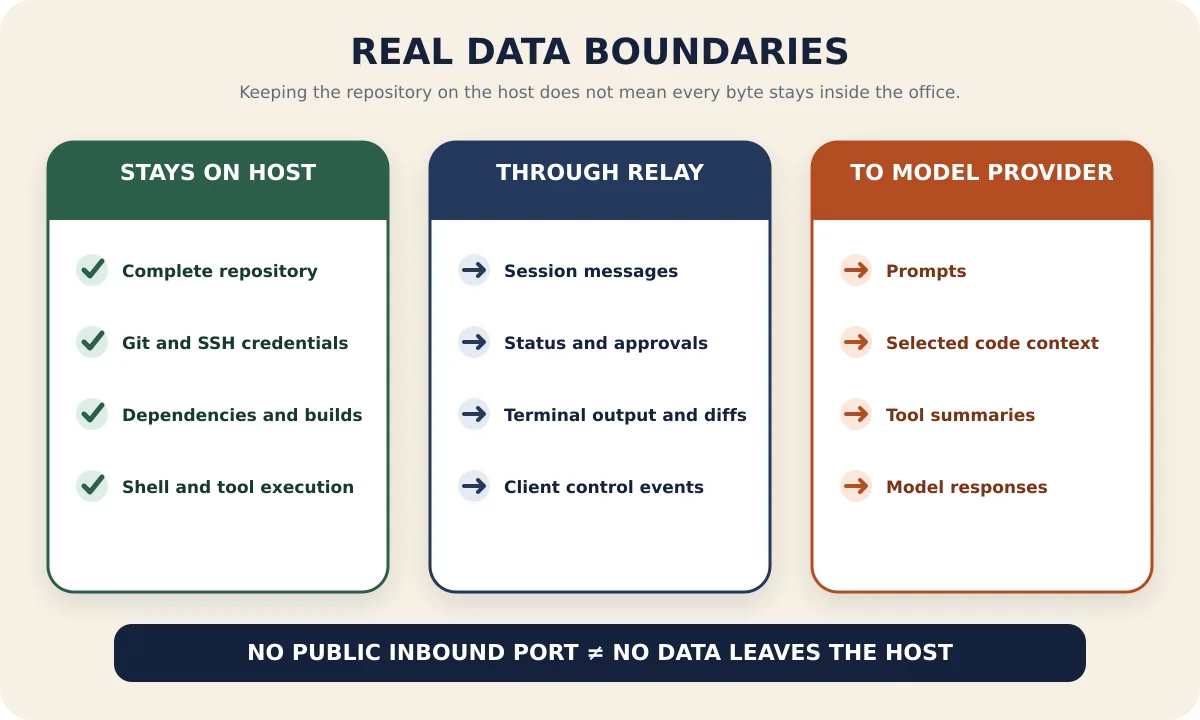
The most common mistake in remote development is describing "the repository was not copied away" as "code never leaves the host." A more accurate data boundary is as follows:
| Data or capability | Actual location and flow |
|---|---|
| Full Git workspace, dependencies, build artifacts | Remain on the company host; commands also execute on the host |
| Local credentials such as Git, SSH, cloud services | Should remain on the company host; do not copy to remote devices or paste into sessions |
| Prompts and context selected by Codex | Sent to the OpenAI/model service configured for Codex on the host, subject to the corresponding account and corporate policy |
| Session messages, status, approvals, terminal output, and diffs | Transmitted over the TLS remote link so authorized clients can display and control |
| Home computer or phone | Can see content in the remote interface and may be screenshotted or copied, so it must still be covered by company endpoint policy |
OpenAI's commitments regarding training, retention, and compliance for enterprise data depend on the plan and workspace you use. Before handling company code, have an administrator review OpenAI Enterprise Data Privacy and your company's vendor approval results; do not assume that a personal ChatGPT account has the same data terms as an enterprise workspace.
Before Leaving Work: Tighten Permissions and Host Status First
1. Obtain Clear Authorization First
At minimum, confirm the following: whether the company allows viewing development sessions on personal devices, whether OpenAI/Codex is allowed, whether user-level background services may be installed, which repositories and environments can be operated remotely, and what retention rules apply to logs, screenshots, and model data.
If the company requires using only managed phones, enterprise VPN, VDI, zero-trust gateway, or a designated ChatGPT Enterprise workspace, follow that solution. This article is not a tutorial for bypassing company network controls.
2. Verify Codex Itself Works on the Company Host
First, run the following on the target host:
codex --versionThen enter a directory where testing is allowed and run Codex to confirm that ChatGPT/Codex login, model permissions, and usage on the host are normal. Do not troubleshoot "Codex is not logged in" and "host cannot connect" at the same time over the remote link, otherwise the two problems are easily mixed together.
3. Install PandaPaw Using a One-Time Device Command
Log in to PandaNpc, open Add Device, choose Add a device, and copy the one-time command generated on the page to the company host to execute. The one-time device command is already bound to the current account, making it easier to audit than manually copying a Bridge ID, Token, or signing key, and it is less likely to leave long-term credentials in chat history.
If the company allows browser authorization, you can also use the normal installation command.
macOS / Linux:
curl -fsSL https://cos.pandanpc.com/pandapaw/install.sh | shWindows PowerShell:
iwr -useb https://cos.pandanpc.com/pandapaw/install.ps1 | iexAfter the normal installation, run pandapaw login as prompted and approve this device in the browser. Do not take screenshots of the one-time command, device key, or authorization page to share in groups, and do not save them into a repository.
4. Change Connection Permission from "Full Access" to "Workspace"
Before using it on a real company repository, open the edit screen for the device connection, expand Connection Permissions, and select Workspace. For Codex, this restricts operations to the project workspace and requests approval when going beyond the workspace or encountering high-risk operations.
Do not keep Full Access just to avoid a few more confirmation clicks. Full Access reduces approvals and sandbox restrictions; once a prompt, dependency script, or remote account goes wrong, the impact may extend beyond the current repository. OpenAI's own practices on running Codex safely also emphasize defining clear boundaries for the Agent, making high-risk operations explicit, and keeping auditable execution records.
If the current task does not require desktop control or Computer Use, keep these two high-risk switches off. Continuing to write code remotely usually only requires files, Shell, diffs, and approvals—not controlling the entire computer's graphical desktop.
5. Prevent Host Sleep, but Do Not Break Company Lock Screen Policy
PandaPaw can run as a background service, but once the company computer shuts down, sleeps, or loses outbound network access, remote sessions cannot continue. You can adjust the power policy within what the company allows to keep the host awake; screen locking, disk encryption, and automatic lock screen should still be preserved.
Whether the host can continue executing while locked depends on the operating system, company endpoint management, and the tools invoked by the task. Tasks that require operating the GUI, browser, or desktop login cannot be assumed to still be available after the screen is locked.
Do a Complete Read-Only Acceptance Check Before Going Home
On the company host, run:
pandapaw statusIt should recognize the PandaPaw service, Codex components, and the bound account. Then, on a phone, browser, or another permitted device, open PandaNpc Agent, select the newly connected host, the Codex engine, and the absolute path of the target project.
For the first time, do not let it modify files. Send this read-only prompt:
Report the current working directory, list the top-level files, and show git status --short.
Do not modify files, run network commands, or change Git state.
The success criteria are not "a green dot appears next to the device," but rather all of the following are met:
- The returned absolute path is exactly the target repository on the company host;
- The top-level files match the actual content on the host;
git status --shortshows no unexpected changes;- Operations requiring additional permissions display an approval prompt on the remote end instead of silently executing;
- No router port forwarding, cloud security group inbound rules, or public SSH/RDP exposure are added during the process.
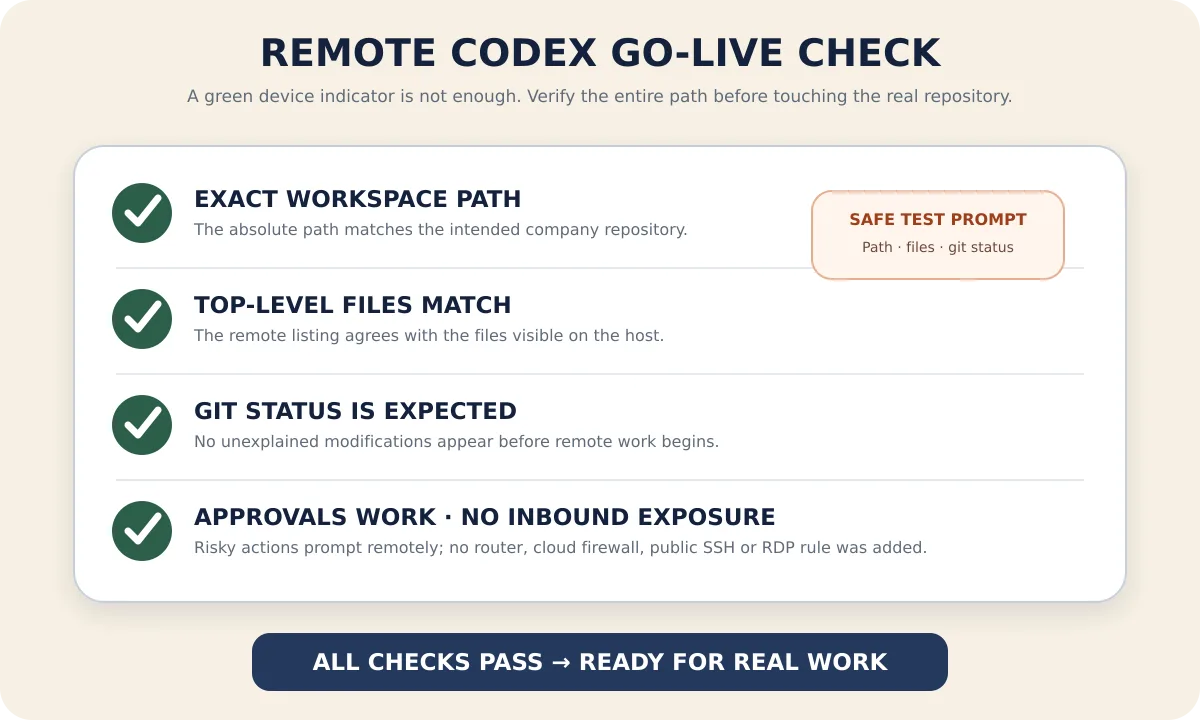
After finishing, close the remote page and reopen the same session. History should be restored, and the host should still show online. This step verifies the actual reconnection path, not just that the installation script downloaded successfully.
How to Continue Tasks After Going Home, Instead of Running "Naked" Remotely
After going home, reopen the same Codex session, first ask it to summarize the last completed step and the current git status, then send the next task. Do not immediately rerun deployment, migration, or push commands just because the last message is stuck at "executing"; when the network briefly disconnects, the original command may have already finished executing on the company host.
Operations that are suitable to approve from the remote end usually include:
- Reading files in the current repository;
- Modifying code and tests in the workspace;
- Running local formatting, static checks, and tests;
- Viewing
git diff,git status, and test results.
Operations that need to stop and verify the target and impact scope include:
git push, merges, releases, and creating external PRs;- Database migrations, production environment changes, and cloud resource operations;
- Reading paths outside the workspace, personal directories, or credential files;
- Opening network access, installing unknown dependencies, or executing unfamiliar scripts in the repository;
- Switching to full access, bypassing approvals, or disabling the sandbox.
Remote approval has the same consequences as clicking "Allow" while sitting at the company computer. With a small phone screen and less context, you should first review the full command, current directory, and target environment before deciding whether to allow it.
How to Choose Between Official Remote and PandaNpc
If the current Codex App and ChatGPT mobile app already provide official Remote, and it meets your company's account, platform, and management requirements, the official solution is the most straightforward. OpenAI's remote implementation also uses a secure relay and explicitly keeps files, credentials, permissions, and the local environment on the machine running Codex.
If you need to directly control the existing Codex CLI, use a Linux host, access from a browser, or manage Codex, Claude Code, and PandaCode from the same entry point, then PandaNpc + PandaPaw is more suitable. For a detailed comparison of the two approaches, continue reading Phone-Controlled Codex: A Guide to ChatGPT Remote and Local CLI Remote Control. If, besides Agent sessions, you also need to access internal web services or SSH on the company host, have an administrator adopt a company-approved private network solution; PandaNpc's device interconnection guide can serve as a reference implementation, but it cannot replace the company's security approval.
In Which Situations Should This Solution Not Be Used
- The company explicitly prohibits personal devices from accessing code, terminal output, or development sessions;
- The company only allows specified VPN, VDI, bastion hosts, or managed endpoints;
- The repository is in an isolated or classified environment that does not allow any external HTTPS/WebSocket or model requests;
- The company has not approved OpenAI/Codex or PandaNpc as a data processor;
- The task must continue after the host is shut down, asleep, or completely offline;
- You cannot restrict permissions to a clear working directory or audit high-risk operations.
These restrictions are not "technical problems" that should be bypassed by adding a port, proxy, or tunnel. For company code, organizational authorization takes precedence over whether the connection is technically possible.
FAQ
Will Company Code Be Downloaded to My Home Computer?
The full repository will not be automatically copied. File reading/writing, Shell, Git, and builds still execute on the company host; the home device displays session messages, diffs, terminal output, and content you actively open, so it is still a viewing endpoint that needs to be protected.
Does Not Opening Public Ports Mean Code Never Leaves the Company at All?
No. It only means the company host does not accept inbound connections from the public internet. Codex still sends prompts and the required context to the configured model service, and remote session data is transmitted through the relay. Whether it complies with regulations depends on the company-approved model account, data terms, and remote access policy.
Do I Need a Public IP, frp, or Router Port Forwarding?
No. Both the PandaPaw host and PandaNpc client actively connect to the authenticated relay. Strict networks may require an administrator to allow outbound HTTPS/WebSocket, but you should not open new public inbound ports for this purpose.
Can Codex Keep Working After the Company Computer Locks Its Screen?
Purely file-based and command-line tasks can usually be continued by the background service, but the host must stay awake, online, and the relevant user services must still be running. Tasks that depend on the graphical desktop, browser login, or Computer Use may stop because of the lock screen.
Is This More Secure Than the Company's VPN or VDI?
They cannot be simply compared. An Agent relay exposes a narrower operational surface than a full remote desktop and does not need public inbound ports; however, company-managed VPN/VDI may provide organizational controls such as device compliance, DLP, audit, and conditional access. If the company has already mandated the use of VPN/VDI, that solution should take priority.
Can I Use a Personal ChatGPT Account to Handle Company Code?
Only if the company explicitly allows it. Personal accounts, Business, and Enterprise have different data controls. Company code should generally use an organization-approved workspace, identity, and model configuration; do not use a personal account to bypass administrator policies.
Conclusion
Secure remote Codex is not about "finding a way to log into the company computer from home," but about keeping the execution environment fixed on the company host and bringing only the necessary control, approvals, and results to authorized devices. When implementing, stick to four lines: obtain authorization first, only use outbound connections, restrict permissions to the workspace, and first verify with read-only prompts.
After confirming the company policy allows it, you can add the host to your account by following PandaPaw Quick Start, then continue the Codex session from the PandaNpc Agent. When it involves public releases, production changes, and credential access, even if the remote link is secure, you should still follow the original manual review and company approval process.
Related guides
Use Codex on Your Phone: ChatGPT Remote vs CLI (2026)
Use ChatGPT Remote to control supported Mac/Windows Codex chats from iPhone or Android; use PandaNpc for Codex CLI, Linux, and headless hosts.
Read article →
Device Interconnect: Connect Your Devices Directly, Anywhere, Anytime – No Public IP, No Port Forwarding Hassle
Want to access Claude Code, SSH, or internal services on your home/office computer from outside using your phone or another computer, but stuck with no public IP, afraid to open port forwarding, and finding frp/PeanutHull configuration annoying? Device interconnection can be enabled with one click in the desktop client, adding each of your devices to your private encrypted network, giving each device a fixed private IP, making them directly connected as if they are on the same LAN no matter where you are — end-to-end encryption, zero public exposure, and one-click revocation at any time.
Read article →
Claude Code Remote Disconnection Troubleshooting: Symptoms, Criteria, and Solutions for Six Types of Disconnections
When Claude Code's remote connection drops, don't rush to reconnect—different types of disconnections have different symptoms, and the fixes are completely different. This article works backward from "what you see" to six causes: machine sleep, network switching killing long-lived connections, screen-mirroring-style solutions requiring the local machine to stay on, half-dead connections, reconnects losing sessions, and processes being reaped. For each cause, it gives confirmation criteria and the corresponding fix, and ends with a step-by-step troubleshooting checklist you can follow.
Read article →