
Codex vs Claude Code: Which Should You Use? (2026)
Codex vs Claude Code: choose Claude for terminal depth and hooks, Codex for ChatGPT/cloud work, and PandaNpc to control both across devices.

Bottom line first: If you're already in the Anthropic ecosystem and rely on CLAUDE.md, Hooks, Skills, and Claude models, choose Claude Code first; if you're already in the ChatGPT/OpenAI ecosystem and want your local CLI, IDE, desktop App, and cloud tasks under the same account, choose Codex first. Both can read and write code, run commands, call MCP, use subagents, and approve dangerous operations — for ordinary development tasks, there is no permanently correct winner.
If you're still unsure, the most practical approach isn't reading a benchmark table — it's having both tools complete the same task in the same real repository: pin the versions, use identical acceptance criteria, and compare whether they understand the project rules, whether the scope of changes stays under control, whether tests are complete, and how many times you need to intervene.
Disclosure: We develop PandaNpc, a remote system that connects Claude Code, Codex, and other local Agents at the same time. The protocol differences in the second half come from real integration experience; we have not run controlled model capability benchmarks, so we won't claim either side is "X% faster at coding" or "has a higher success rate." Codex in this article refers to OpenAI Codex, not other products with the same name.
Information was verified as of August 30, 2026. Both sides update quickly; for volatile features, refer to the Claude Code official documentation and the OpenAI Codex official page.
OpenAI Codex vs Claude Code: The Core Differences in One Table
| Dimension | Claude Code | OpenAI Codex |
|---|---|---|
| Primary account ecosystem | Claude / Anthropic | ChatGPT / OpenAI |
| Local entry points | CLI, desktop App, IDE extension | CLI, Codex in the ChatGPT desktop app, IDE extension |
| Cloud entry points | Claude Code on the web, Slack, CI, etc. | Codex Web/Cloud, Slack, SDK, GitHub workflows, etc. |
| Long-term project instructions | CLAUDE.md, Rules, Skills |
AGENTS.md, Skills, project configuration |
| External tools | MCP, plugins, Hooks, Channels | MCP, plugins, Skills, SDK |
| Parallel work | Subagents, Agent teams, worktree sessions | Multiple agents, built-in worktree, parallel cloud tasks |
| Permission boundaries | Permission modes, Hooks, sandbox and organization policies | Approval policies, system-level sandbox, rules and organization policies |
| Official mobile remote | Claude App and claude.ai/code control local CLI/VS Code sessions |
ChatGPT Mobile's Remote entry controls supported desktop Codex sessions |
| Best for | Teams already on Claude workflows that need deep lifecycle automation | Teams already on ChatGPT/OpenAI that need local and cloud tasks working together |
This table compares workflows, not model leaderboards. Model versions, context windows, speed, and quotas all change; writing a model's advantage at one point in time as "this Agent is forever stronger" usually goes stale within a few weeks.
Claude Code vs Codex: Pick Directly by Your Scenario
Choose Claude Code If You Value These
- The project is already organized around Claude. The repository already has
CLAUDE.md, Rules, Skills, Subagents, or Hooks; migrating them costs far more than switching a model name. - You need fine-grained lifecycle automation. Claude Code's Hooks can enforce checks on events such as tool calls, permission requests, file modifications, compaction, and session end; security gates that must run "every time" are easier to keep outside the Agent.
- You mainly use Claude models and an Anthropic account. Accounts, quotas, admin policies, and existing sessions all stay in the same system.
- You want to control a local CLI directly from the browser. The official Remote Control explicitly supports Claude App and
claude.ai/codetaking over a local CLI or VS Code session.
Choose Codex If You Value These
- Your team already uses ChatGPT/OpenAI. Codex CLI, IDE, desktop, and cloud tasks can share the ChatGPT identity and workspace policies.
- You often hand tasks off to the cloud to finish in the background. Codex keeps local interaction and cloud delegation in the same product family, which suits async PRs, code review, migrations, and batch maintenance.
- You want to manage multiple parallel tasks in one interface. The Codex App emphasizes built-in worktree and multi-agent workflows, good for dispatching tasks, viewing progress, then merging results.
- You need an SDK or automation entry point. Besides
codex execin the CLI, OpenAI also offers the Codex SDK, Slack, and GitHub workflow entry points, suitable for embedding the Agent into existing engineering systems.
Using Both Is Also Perfectly Reasonable
Large tasks and real teams are rarely decided by model capability alone. You can let Claude Code handle repositories where Claude Hooks/Skills have already been baked in, let Codex handle cloud tasks in the OpenAI workspace, or do cross-review of high-risk changes in the same repository. What you really want to avoid: both sides modifying the same checkout at the same time, with no worktree, no task boundary, and no single owner for the final merge.
Code Quality and Model Capability: Why This Article Names No Permanent Winner
"Which writes code better, Claude Code or Codex?" is the most common question — and the easiest one to answer badly. An Agent's results are affected by model version, reasoning effort, context, repository instructions, tool permissions, test speed, and task type. A casual one-off question can't represent long-term performance, and vendor customer stories can't replace acceptance testing in your own repository.
Try comparing with a set of real tasks:
- A feature change spanning 3–5 files;
- A bug with a failing test;
- A read-only code review;
- A task that requires checking documentation, running tests, and explaining trade-offs.
Record first-try success rate, out-of-scope changes, test evidence, number of manual corrections, and total time. Don't just compare whose final answer sounds smarter.
Free vs Paid Plans: First Separate Agent Quota from Remote Control Eligibility
"Can I use it for free?" actually involves two different ledgers: the first is Claude/Codex model and Agent usage quota; the second is remote clients, online devices, and concurrent session quota. PandaNpc only solves the second layer of connectivity — it doesn't bundle an Anthropic or OpenAI model subscription.
| Product | Free scope | Paid/subscription scope | Easiest thing to misunderstand |
|---|---|---|---|
| Claude Code | The CLI can be used pay-as-you-go with an Anthropic API Key or a supported cloud provider; a regular Claude Free account does not include official Remote Control | Pro, Max, Team, and Enterprise can run Claude Code with a subscription identity; Remote Control currently requires one of these paid subscriptions | Claude Code itself isn't subscription-only, but the official Remote Control must be logged in with a paid Claude.ai subscription — API Key, Bedrock, Vertex, and Foundry are not supported |
| Codex | OpenAI periodically opens time-limited Codex quota to Free/Go users, depending on current promotions and the account; don't treat it as a stable long-term benefit | Plus, Pro, Business, Enterprise, Edu, and other plans can use Codex CLI, IDE, Web/Cloud, and supported App workflows; quota and concurrency vary by plan | Codex Remote also depends on the desktop App version, the same ChatGPT workspace, device authorization, and admin/RBAC policies |
| PandaNpc | Free: up to 2 Agent devices online and 5 concurrent Agent sessions; connection capabilities such as Claude Code and Codex remote control, device private networking, and MCP are available | VIP: 10 devices / 10 sessions; SVIP: 50 devices / 50 sessions, plus higher quotas on other products | A PandaNpc membership expands connections and concurrency; it does not pay for Claude, ChatGPT, API, or custom model usage on your behalf |
As of August 30, 2026, the eligibility listed on Anthropic's Remote Control requirements page is Pro, Max, Team, and Enterprise, with API Key explicitly excluded; Team/Enterprise may also require an admin to enable it. OpenAI has run time-limited offers for Free/Go, so whether Codex is "free to use" must be judged by what the account currently shows, not written as a permanent promise. For PandaNpc's latest tiers and pricing, see the membership page; model consumption and membership subscriptions are two separate accounts.
Claude Code vs Codex: What's the Difference in Remote Control?
What they have in common: code and tools still run on the host, and the phone is only a control surface; if the host sleeps, shuts down, or loses network, neither can keep executing local tasks. But the two official entry points are currently asymmetric.
| Remote capability | Claude Code Remote Control | Codex Remote | PandaNpc |
|---|---|---|---|
| What it controls | Local Claude Code CLI or VS Code session | Supported Codex sessions in the ChatGPT/Codex desktop app | Claude Code, Codex CLI, PandaCode, DeepSeek harness, Pi, etc. on the host |
| Host systems | Any local host supported by Claude Code | Centered on the macOS/Windows ChatGPT desktop app | Windows, macOS, Linux, servers, and dev containers |
| Startup / pairing | claude remote-control, claude --remote-control, /remote-control |
Desktop settings allow discovery and control; device authorization happens in the same ChatGPT workspace | Install PandaPaw on the host and log in to an account, or join unattended with a one-time device key |
| Mobile entry | Code page in the Claude App | Remote tab in ChatGPT Mobile | PandaNpc iOS and mobile browsers |
| Browser entry | claude.ai/code can control local sessions |
Official help currently says Codex can't be selected directly on Web/Mobile; Remote is mainly for connecting mobile to desktop sessions | The /agent web page can control every connected engine |
| Desktop to desktop | Any browser can go to claude.ai/code |
Official Remote isn't desktop-to-desktop project access; cross-desktop usually goes through SSH/remote projects | Windows/macOS/Linux desktop apps share the same connection list |
| Local files and tools | Stay on the Claude Code host, preserving local MCP and config | Stay on the desktop Codex host | Stay on each Agent's host; the remote end only relays messages, status, diffs, and approvals |
| New sessions | Server mode can create sessions on a specified host from the remote end | Centered on authorized devices and supported desktop sessions; capabilities change with App versions | Choose machine, engine, and working directory to create or resume a session |
| Official account restrictions | Paid Claude.ai subscription; API Key and third-party providers can't use official Remote Control | The same ChatGPT account/workspace; may be limited by plan, admin, and RBAC | The PandaNpc account handles connectivity; model authentication still uses each engine's own subscription/API/provider on the host |
| Multi-engine / multi-machine | Claude Code only; each host registers separately | Codex only; centered on ChatGPT/Codex devices | One account manages multiple engines, machines, device private networking, and online status |
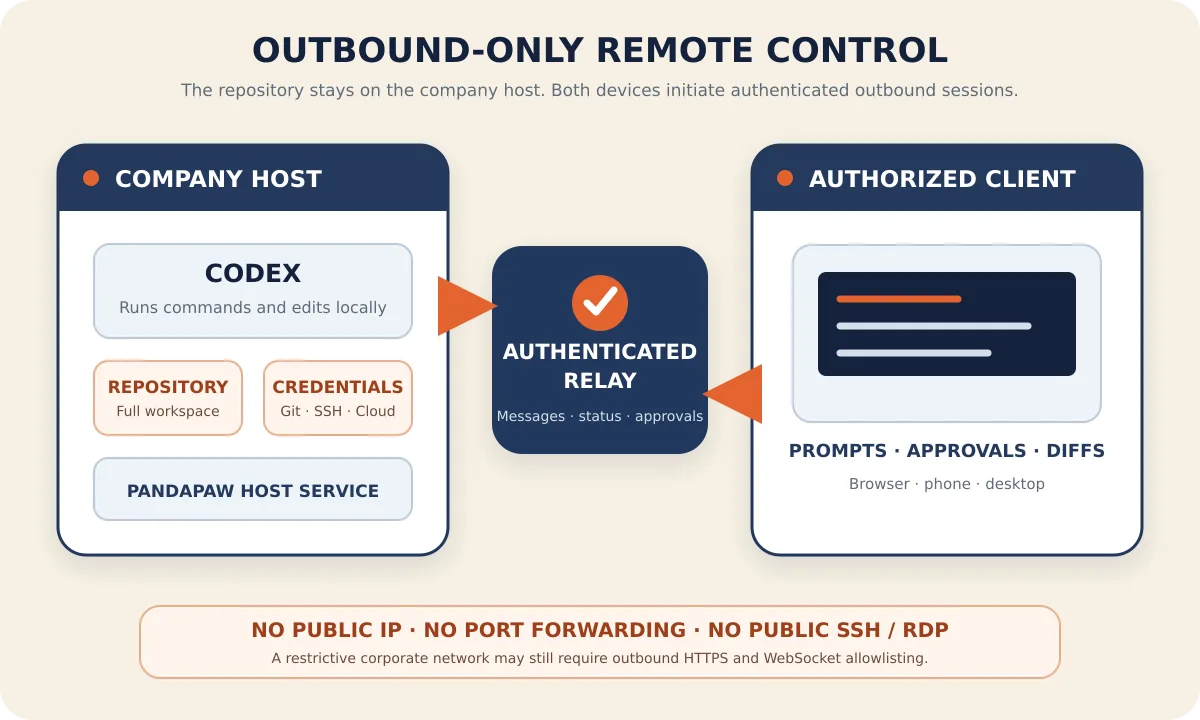
| Public inbound port | Not needed | Not needed | Not needed; both hosts and clients actively connect to an authenticated relay, and device private networking prefers direct connections |
| Free usage | Official Remote Control doesn't support Claude Free | Free/Go may get periodic quota; Remote eligibility depends on what the account actually shows | Free supports 2 online Agent devices and 5 concurrent sessions; upstream model eligibility is still on you |
Claude Code Remote Control is more like "expose one local CLI session to Claude Web/Mobile"; the official Codex Remote documentation is more like "connect from ChatGPT Mobile into a supported desktop Codex session." If you also need another desktop computer, a unified browser entry point, Linux hosts, custom models, or to manage Claude Code and Codex CLI at the same time, you need an extra remote connection layer.
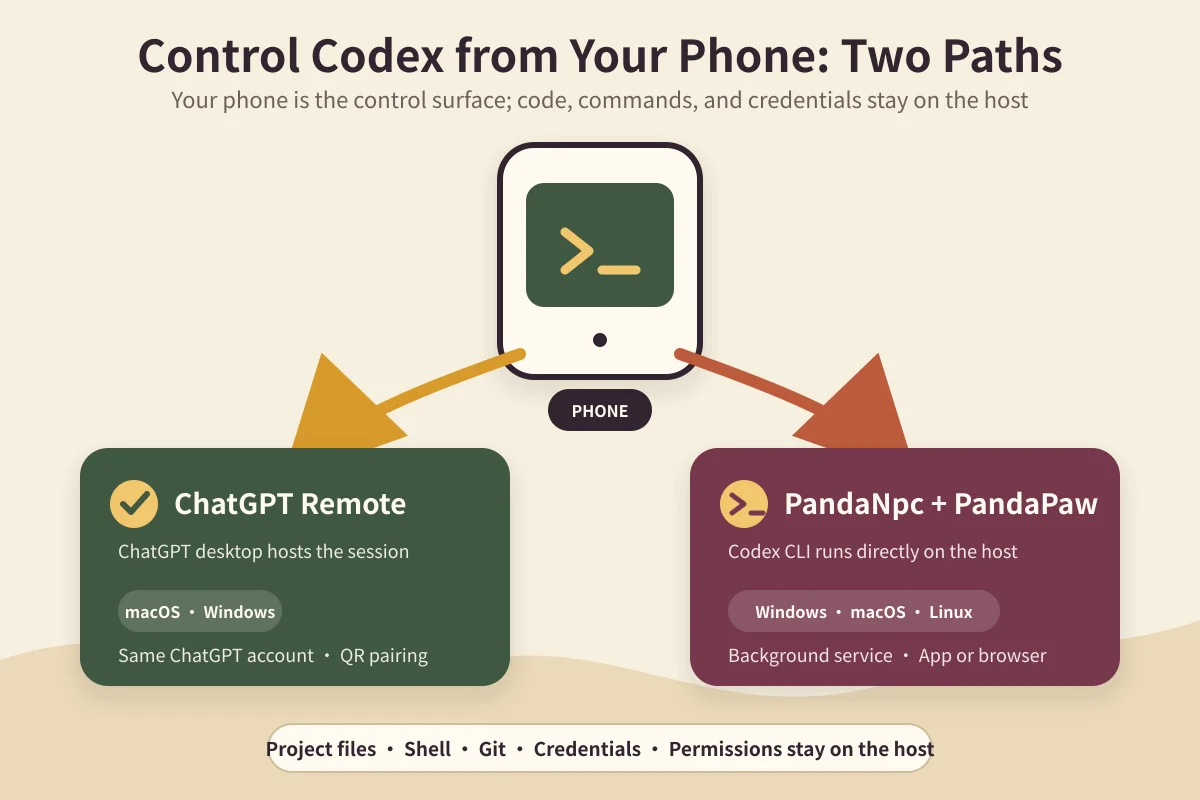
PandaNpc's approach is to run PandaPaw next to the host and expose Claude Code, Codex, PandaCode, and other connections uniformly to browsers, iOS, and desktop clients. Both sides only make outbound connections, so no public Agent port needs to be opened; tool execution still stays on the host.
For more complete official/PandaNpc remote steps, see the Claude Code Remote Control guide and the Codex mobile remote control guide.
Permissions, MCP, and Customization: How Do They Compare?
Both sides can connect to MCP, and both provide file, Shell, search, and patch tools; the real difference is "how tools are constrained" and "where project conventions live."
- Claude Code:
CLAUDE.mdprovides persistent project context, Skills load workflows, Hooks enforce deterministic gates at lifecycle points, and Subagents/Agent teams handle isolation and parallel work. - Codex:
AGENTS.mdand Skills express project conventions, approval policies and a system sandbox control local permissions, App/Cloud provide parallel tasks and worktree, and the SDK plugs the same Agent into automation systems.
If your team cares most about "every Agent must run the same checks," don't just write the requirements into the prompt. Put tests, dangerous command blocking, secret scanning, and deployment authorization into Git, CI, sandboxes, Hooks, or another external enforcement layer — both Agents can then only work inside that boundary.
Deep Dive: Why Two Engines in the Same System Can't Share One Adapter
Before talking about differences, it's worth being clear: the mental models of these two tools are highly similar — both run in a terminal, both work in sessions, both call tools to edit files and run commands, both ask the user to confirm dangerous operations, and both can handle multi-turn tasks within one session. That's exactly why, when integrating, it's easy to conclude "one adapter layer is enough" — and that's how we started.
The difference isn't at the capability layer; it's at the protocol layer. In other words, the behavior you see in the terminal can be almost identical, while the frames they emit, the order of those frames, and the way fields are organized are all different. This is exactly why such differences are hard to discover ahead of time: if you only use them on your own computer, you'll never hit them.
Seven Protocol Differences at a Glance
| # | Dimension | Claude Code behavior | Codex behavior | Who gets bitten if you ignore it |
|---|---|---|---|---|
| 1 | Assistant message identifier | Has a stable id | May not have one | People doing message persistence / multi-device sync |
| 2 | Session liveness check | Batch form, one group at a time | Expects a single session id | People building online-status display |
| 3 | History replay order | Matches real timeline | Sub-thread activity frames are appended as one batch at the end | People building subagent / multi-thread views |
| 4 | Tool call command structure | Complete | May be fragmented | People building tool approval UIs |
| 5 | Channel event subscription | Takes the role of executing session switches | Can't execute a switch at the same time | People building multi-path relays |
| 6 | Online connection quota | Shares the same counting pool with Codex | Same as left | People enforcing quota limits |
| 7 | Long-history performance | Linear | Can degrade to non-linear if mishandled | People building mobile clients |
Below we expand each one, following "symptom → how to locate it → how to fix it."
1. Do Assistant Messages Have Stable IDs? — It Determines Your Deduplication Strategy
Symptom: Open a Codex session and everything looks fine right after the conversation; exit and click back in, and the same assistant reply becomes 2, then 3 copies — the more you re-enter, the more there are. User messages are unaffected; only assistant replies multiply. This never happens in Claude Code sessions.
How to locate it: This symptom is very easy to misdiagnose as a client-side rendering problem or duplicated history loading, and then you dive into the frontend. The correct first step is to look directly at how many records are actually stored in the server-side cache — if the cache really has N records, the problem is in the data layer, not rendering. That's the step that pulled us back from the client side.
Root cause: Claude Code assistant messages carry a stable identifier, so when replay and real-time pushes arrive, you can deduplicate directly by id. Codex assistant messages aren't guaranteed to carry such an identifier, so when you reuse the same "deduplicate by id" logic, the same reply gets written in as two different messages.
How to fix it: For messages without a stable id, switch to collapsing by "turn anchor + content" — the anchor is the hash of the most recent user message before this reply.
⚠️ There's a pitfall here worth calling out separately: Our first version collapsed by pure text. After it went live, scanning historical data revealed it had wrongly deleted 691 identical replies across turns. The reason is that Codex's short replies repeat at a very high rate (things like "OK." and "Done."), and the deduplication set was session-scoped — once a sentence's hash was recorded, the same sentence in any later turn of that session would be swallowed. That's content loss, which is worse than duplication. The anchor layer can't be skipped.
2. Liveness Checks: One Wants a Single Item, the Other a Batch
Symptom: The session is clearly running, but the UI shows it as offline.
How to locate it: This difference looks like it can be generalized — the field names are similar on both sides, so when writing the code it's easy to think one code path can handle both. The way to tell is simple: send the batch structure over and see whether the response is the shape you expect.
Root cause: The two sides have different API shapes for asking "is this session still alive?" On the Claude Code side we used a batch form that carries a group of session ids at once; the Codex side expects a single session id.
How to fix it: Split this into two call paths and don't try to share one. The difference itself isn't hard to handle; the problem is that it doesn't error — sending the wrong structure won't throw an exception, you just get a semantically wrong answer.
3. Frame Order on History Replay Differs — Subagent States Get Stuck
This is the most convoluted one to debug.
Symptom: The subagent status dot in the sidebar stays orange "running" and keeps pulsing, even though it actually finished or was interrupted long ago. Refreshing the page doesn't fix it either — every refresh replays the problem. It only happens in Codex sessions.
How to locate it: "Refreshing doesn't fix it" is the key clue. It tells you the problem isn't in real-time push, but in history replay itself — every replay rewrites the state incorrectly.
Root cause: On replay, all of the parent thread's entries are emitted first (including the notification frames saying "subagent finished"), then each sub-thread's activity frames are appended as a batch at the end. So the client receives this order: it sees the "interrupted" notification first, then activity frames that are earlier in time. And the logic that writes the state doesn't compare timestamps, so the later-arriving but earlier-in-time batch unconditionally rewrites the terminal state back to "running."
How to fix it: Add a terminal-state guard to the state-writing branch — once a state is terminal (finished/failed/stopped), only a later frame may overwrite it. Make sure the check shares the same state mapping as everywhere else; don't write a second mapping, or the two places will drift on what counts as terminal.
The common feature of these problems: any single frame looks valid; what's wrong is their relative order. So staring at per-frame logs will never reveal the issue.
4. Tool Call Command Structure: It Can Fragment
Symptom: In a Codex session's tool card, commands display as fragments like 1,220p or /pid=…/ {print}; sometimes a whole script gets split apart, and sometimes after the answer finishes there are still tool cards left hanging without closure.
How to locate it: Look at the actual structure of the command field in the raw frames, not at the rendered result. If you follow Claude Code's field path to get "what command the user executed," what you get back is the fragmented pieces.
How to fix it: Write a separate command reassembly layer for Codex that stitches fragments back into the complete command before handing it to the UI.
This difference is especially brutal for people building tool approval: the user has to tap "Allow / Deny" on their phone, but the command shown on the card is in pieces — that's asking someone to sign blind. A security feature becoming meaningless is far worse than an ugly display.
5. Channel Event Subscription Surfaces Differ
Symptom: Two users kick each other offline.
Root cause: If both relay paths subscribe to and execute "session switch" events, each side kicks out one victim, producing a double eviction. A switch action must have a single executor.
How to fix it: Our approach was to make the Codex path subscribe only to kick-out and cache-invalidation events, never to switch events, pinning the right to execute switches to the other path.
This kind of deliberate "don't do something" decision usually leaves only one line of comment in the code, but it was added only after we got burned once — and if a later developer "helpfully completes" that constraint, the incident will reproduce. So the comment needs to say why it's not done, not just that it's not done.
6. Quota and Connection Counting Are Combined
Symptom: Users think they still have quota when they've actually exceeded it.
Root cause: If, like us, you cap the number of online connections, note that connections from both engines land in the same counting pool. When a user has Claude Code and Codex sessions open at the same time, both draw from the same quota.
This isn't a flaw; it's a design choice — from the user's perspective, "how many sessions can I have open at once in total" is easier to understand than "how many per engine." But if your implementation counts per engine, the remaining quota shown in the frontend won't match what the backend actually deducts.
How to fix it: First decide which accounting convention you want, then make sure the frontend and backend use the same one. Mixing two conventions is worse than picking the wrong one.
7. Performance Characteristics Differ as History Grows
Symptom: The mobile client freezes when opening a session with a long history.
Root cause: We hit an obvious freeze on iOS once. The root cause was an operation in history processing that grew quadratically with the number of messages. To be clear, this wasn't a problem with the engine itself, but with its history structure not matching how we originally processed it — the same processing approach never surfaced on the other engine.
How to fix it: Replace the repeated per-message scans with a one-time index. More importantly, design for it up front: long history has to be considered from day one; you can't wait until users have accumulated thousands of messages to discover the problem.
For Platform Integrators: Codex CLI vs Claude Code — Which Is Easier to Integrate?
A note first: the following recommendations are from an integration perspective, not a coding capability evaluation. We haven't run comparative benchmarks, and no claim like "X is Y% faster" will come from this article.
Cases Where Codex Is the Better Fit
- Your team is already in the OpenAI ecosystem — accounts, quotas, and billing are all in one place, and one less set of accounting and credential management is a convenience that shouldn't be underestimated.
- Your workflows are already built around its session and task model — refactoring surrounding tooling just to migrate is usually not worth it; the seven differences above, reversed, are exactly your migration cost.
Cases Where Claude Code Is the Better Fit
- You're building your own surrounding tooling — from our integration experience, messages with stable identifiers make persistence and multi-device sync much easier; differences 1, 3, and 4 are all easier to handle on this side.
- You're building interactions like tool approval — the command structure is complete, so building an approval UI needs no extra stitching, and there's no "signing blind" risk.
If You Only Want to Swap Models, You Don't Necessarily Need to Swap Agents
If all you want is "run the same interactions with a different model," then swapping engines isn't as good as swapping the model backend. Part of the reason we built PandaCode is exactly this: keep the interaction layer unchanged and swap the model.
If You're Migrating: What the Seven Differences Cost to Rework
Many people search these two names because they're really evaluating "if I already use one, what does it cost to switch to the other?" Below, we convert the seven differences above into migration cost.
A note: This section is the rework effort derived from the seven differences above, not a record of a full migration we performed — our path was "integrate both at the same time," not "switch from one to the other." So treat it as a checklist, not an estimate of engineering hours.
Migrating from Claude Code to Codex, the rework concentrates on these areas:
- The deduplication logic must be rewritten (item 1) — this is the easiest one to underestimate. The old deduplicate-by-id code can't be reused as-is, and when it's wrong it doesn't error; it silently duplicates or silently drops messages. If you have message persistence, decide what your anchor is before migrating.
- The liveness check needs a different call shape (item 2) — small effort, but if you miss it, sessions show "offline while running," with no exception raised.
- Everything that depends on historical ordering must be re-verified (item 3) — subagent views, progress bars, and any logic that "infers current state from history" all fall in this category.
- The tool approval UI needs a command reassembly layer (item 4) — if your product has an approval feature, this one can't be skipped, or you're asking users to sign blind.
The reverse direction (Codex to Claude Code) is usually cheaper: deduplication can simplify back to by-id, and the command structure needs no reassembly layer. But be careful not to just delete the compatibility layer written for Codex — if you want to keep the ability to support both, that layer is an asset, not a liability.
What you must re-confirm in both directions: the quota convention (item 6) and long-history performance (item 7). These two are less directly tied to the engine, but they're the parts most likely to be forgotten when re-testing after an engine swap.
One piece of advice: If your system is already live and has existing session data, run the new logic against the existing data first as a comparison before switching over — don't just flip the switch. That's exactly how we learned the lesson of the 691 wrongly deleted messages — the logic itself looked fine, and only scanning historical data revealed it would swallow content. New logic being correct ≠ being safe for existing data.
Our Approach: Don't Choose — Connect Both
Because we needed to support both, our conclusion was to absorb the differences in a middle layer — exposing a unified message and session model upward, and adapting per engine downward. The cost is that every added engine requires re-aligning the seven behaviors above; the benefit is that users can switch engines freely in the same interface, with consistent session, history, and approval experiences.
Verification Checklist for Integrating a New Engine
If you're going down this path, verify in this order — the first four decide whether it works at all; the last three decide whether production will break:
- Message identifier — Do assistant messages have a stable id? If not, what's your deduplication anchor?
- Session liveness — Does the liveness API take a single item or a batch? If you send the wrong structure, does it error or silently give a wrong answer?
- History replay order — Does the replayed frame order match the real timeline? Especially when sub-threads are involved.
- Tool call structure — Is the command field complete when you extract it? Can it be fragmented?
- Event subscription surface — Which events must have a single executor? What happens if executed twice?
- Quota convention — Is counting per engine or combined? Do frontend and backend agree?
- Long-history performance — When the message count grows 10x, does processing time grow linearly or faster?
For each item, verify once with a small data set and again with a large history — items 3 and 7 only surface once the data volume grows.
Reverse Lookup by Symptom: Which Difference Did You Hit?
If you've already hit a problem, working backward from the symptom is usually faster than reading through the docs:
| Symptom you see | Most likely | One-step way to confirm |
|---|---|---|
| Assistant replies multiply after exiting and re-entering | Item 1 (message identifier) | Look directly at how many records are stored in the server-side cache — one glance tells you whether it's the data layer or rendering layer |
| Session is running but shows offline | Item 2 (liveness check) | Check whether the liveness request sends a single-item or batch structure |
| Subagent state stuck on "running," refresh doesn't fix it | Item 3 (replay order) | "Refresh doesn't fix it" is the criterion: the problem is in replay, not real-time push |
| Commands in tool cards are fragmented / tool cards still hang after the answer ends | Item 4 (command structure) | Look at the structure of the command field in raw frames, not the rendered result |
| Two users kick each other offline | Item 5 (subscription surface) | Check whether two executors are processing switch events at the same time |
| Frontend shows quota remaining, but the backend has already exceeded it | Item 6 (quota convention) | Confirm whether frontend and backend count per engine or combined |
| Mobile freezes when opening a session | Item 7 (long history) | Compare timing with sessions whose message count doubles, and see whether it's non-linear |
A general heuristic: If a symptom reproduces reliably on every refresh, the problem is most likely in history replay or the data layer; if it only happens occasionally during real-time interaction, then go look at the push path. This heuristic has saved us a lot of time — items 1 and 3 were both initially misdiagnosed as client-side problems.
FAQ
Claude vs Codex: Which Is Actually Better?
There's no permanent winner independent of task and version. If you've already built workflows around Claude Hooks, Skills, and CLAUDE.md, choose Claude Code; if you already use ChatGPT, the Codex App, cloud tasks, and the OpenAI workspace, choose Codex. For high-risk projects, pinning the same task and acceptance criteria and running an in-repo comparison is more reliable than reading third-party benchmarks.
Can Free Claude Code Users Use Remote Control?
Officially, Remote Control currently requires a Claude.ai Pro, Max, Team, or Enterprise subscription, and explicitly does not support API Key, Bedrock, Vertex, Foundry, or similar authentication methods. The Claude Code CLI itself can still run pay-as-you-go with an API Key or a supported cloud provider, but that doesn't grant official Remote Control eligibility.
Can Free Users Use Codex?
OpenAI periodically offers time-limited Codex quota to Free/Go users, but this is not a stable permanent benefit. For long-term use, rely on currently supported plans such as Plus, Pro, Business, Enterprise, and Edu; Remote is also affected by desktop App version, device authorization, and workspace policies.
Does the PandaNpc Free Plan Include Claude or Codex Model Quota?
No. PandaNpc Free provides up to 2 Agent devices online and 5 concurrent Agent sessions, plus remote control and device interconnect; Claude, ChatGPT, API, or other model costs are still covered by the user's own upstream accounts.
Codex vs Claude Code vs PandaNpc: How to Choose Remote Control?
If you only control the official Claude Code CLI, Claude Remote Control is the most direct option; if you use the ChatGPT desktop Codex and mainly connect from your phone, Codex Remote is the priority; if you want to uniformly control Claude Code, Codex CLI, and multiple Linux/Windows/macOS hosts from a browser and various desktop systems, or keep API and custom model configurations, use a multi-engine connection layer like PandaNpc.
Is Codex CLI the Same as OpenAI Codex?
The Codex discussed in this article refers to OpenAI's command-line coding tool. There are other products on the market also called Codex (including some software in legal and compliance fields), which makes searching confusing; adding "CLI" or "OpenAI" as a qualifier is much more precise.
Do These Differences Change with Versions?
Yes. Every item above is behavior we hit at a specific point in time, and both engines are iterating quickly. That's why the verification checklist matters more — the specific differences will change, but the dimensions you need to verify mostly won't.
Can I Integrate Both Engines at the Same Time?
Yes — that's exactly what we do. The key is absorbing the differences in a middle layer instead of letting them leak into the UI layer; otherwise, every added engine forks the UI logic once more.
Next Steps
We plan to add a set of comparative task tests (the same batch of tasks, pinned versions, public methodology, and raw outputs) and will update this article with the results. Until then, this article contains no performance or success-rate numbers — we won't write that something was tested when it wasn't.
This article is based on our real engineering experience integrating Claude Code and OpenAI Codex into the same remote access system, last updated on 2026-08-30. Both engines are continuously updating; for specific behavior, refer to each official documentation.
Related guides

How to Use Claude Code Remote Control from Your Phone (2026)
Use Claude Code Remote Control from your phone or browser. Learn the three official commands, setup limits, troubleshooting, and when PandaNpc fits.
Read article →
Can you share a Claude subscription? How to safely share Claude Code with friends and team (no password, revoke anytime)
Yes — and you don’t need to hand your account password to anyone. PandaNpc lets you share the Claude Code connection on your machine via a link with friends, family, or teammates: they remotely use your subscription quota to run Claude Code. Each share is an independent, revocable token with 1/7/30-day or permanent validity; one-click revocation disconnects them instantly, without affecting your own usage at all.
Read article →
Use Codex on Your Phone: ChatGPT Remote vs CLI (2026)
Use ChatGPT Remote to control supported Mac/Windows Codex chats from iPhone or Android; use PandaNpc for Codex CLI, Linux, and headless hosts.
Read article →