
Recover Your Claude Code History After /compact
Claude Code history gone after /compact? The data isn't lost — PandaNpc stitches the full history along the compaction chain, recoverable on desktop and web, across multiple compactions, without touching the real context.

Using Claude Code for a long time, you've definitely encountered this: when the context is nearly full, it automatically (or you manually /compact) compresses the history once. After compression, that large section of previous dialogue "disappears" — you want to scroll up to see what was discussed, which files were changed, why a certain decision was made, but you're left with only a compressed summary, all details gone. Switching to another computer and resuming the session, you only see the compressed part.
Many people think this history has been deleted. Actually it hasn't — they are still lying safely on the disk, just that Claude Code itself doesn't show them to you. This article will explain why this happens and how to recover the complete dialogue before compression.
1. Why old messages are invisible after `/compact`
Claude Code's session records are written in local JSONL files (~/.claude/projects/<project>/<session_id>.jsonl). When /compact is triggered, it does something many people didn't realize:
- It forks a new session_id, opens a new JSONL file, with the first line being the compression summary;
- All the dialogue before compression stays in the old JSONL file, untouched;
- Afterwards,
claude --resumeonly continues with the latest session, it no longer loads or displays the old files.
So the "history disappearance" you see is essentially: Data is not lost, it's just that Claude Code's resume view only recognizes the latest segment, leaving the old segments before compression aside. If you've compressed several times, there will be several old JSONL files, each segment disconnected, and Claude itself will always only show you the last segment.
2. How PandaNpc recovers the complete history
When PandaNpc remotely accesses Claude Code, it does something Claude itself does not do: It follows the /compact fork chain and splices each segment of history back in order.
Specifically:
- It records the entire compression chain (linking old session_ids before compression one by one, plus the current latest one);
- When restoring a session, it loads each segment's JSONL in order
[old segment 1 → old segment 2 → … → current segment]and concatenates them, restoring a complete timeline; - At each
/compactposition, a clear─── /compact ───separator line is inserted, letting you see at a glance "a compression happened here"; - When you scroll up on the desktop/web client, you can see all original dialogue before compression — every message, every tool call, every code change, not a single one missing.
And it supports multiple compressions: if compressed N times, it splices back all N+1 segments of history.
🔑 Key point: This compression chain is only used for "display", and does not affect Claude's real context.
claude --resumestill uses the context it should (the latest compression summary), PandaNpc just additionally reads out the old segments for you to see. In other words — you both enjoy the freed context from compression and do not lose any historical readability.
3. How to use
Install pandapaw on the development machine (one command):
macOS / Linux:
bashcurl -fsSL https://cos.pandanpc.com/pandapaw/install.sh | shWindows (PowerShell):
powershelliwr -useb https://cos.pandanpc.com/pandapaw/install.ps1 | iexOn another computer, open the PandaNpc desktop client, or visit https://pandanpc.com/agent in a browser, connect back to your development machine, open any session that has undergone
/compact— scroll up, the complete history before compression is there, with separator lines clearly marked.
4. Summary
/compactdoes not delete history, it's just that Claude Code's resume view does not display the old segments before compression.- PandaNpc splices the full JSONL along the compression chain, allows complete viewing on desktop/web, marks each compression with
─── /compact ───, supports multiple compressions. - Pure display, does not affect real context, you can have your cake and eat it too.
Official website to download desktop client (Windows / macOS / Linux) or use web version directly: https://pandanpc.com. If you're tired of not being able to scroll history after /compact, you can give it a try.
Related guides
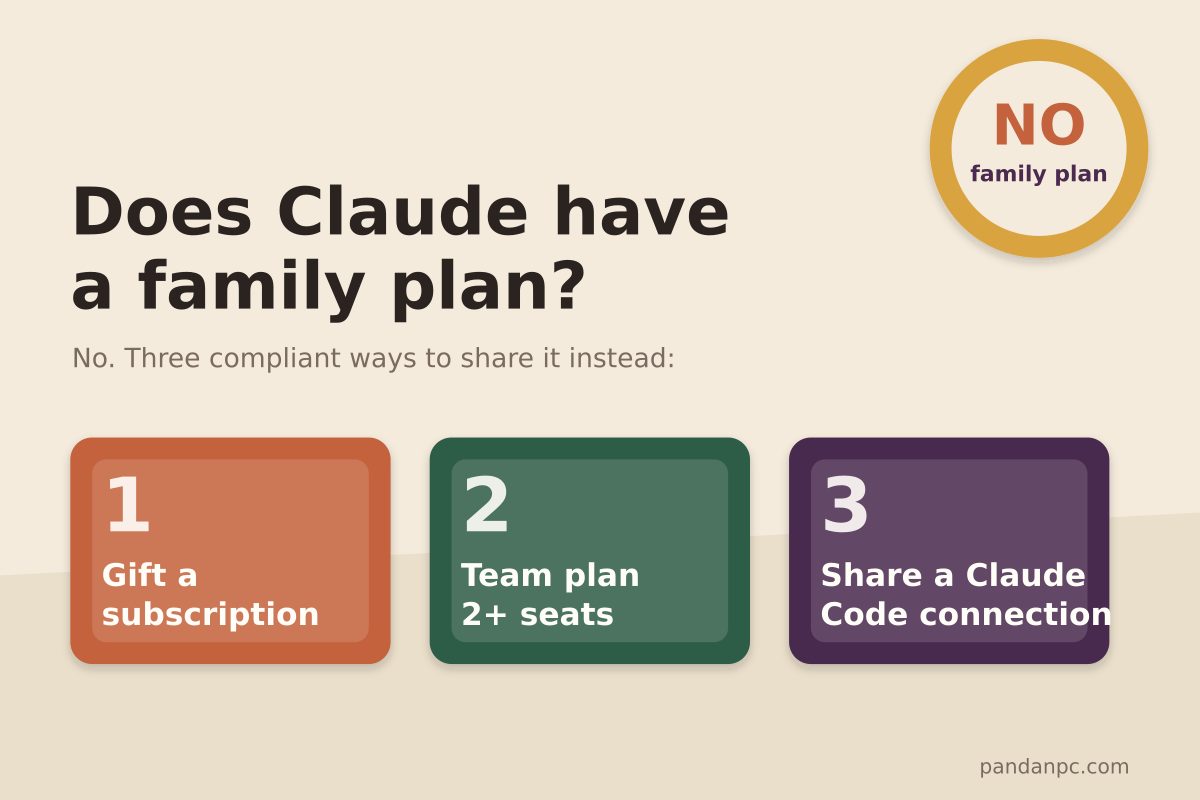
Does Claude have a family plan? Team plan pricing, seat rules, and 3 compliant ways to share Claude with family and friends (2026)
No — Claude currently does not have a family plan. This article cross-checks the official pricing page and help docs to verify the Team plan's seat pricing (standard seats US$20/25, premium seats US$100/125), 2-seat minimum, corporate email requirement, and other rules; compares the differences between Pro, Max, Team, and Enterprise; and offers three ways for family and friends to share Claude without violating the terms: gifting subscriptions, a Team plan, and sharing a Claude Code connection.
Read article →
Claude Code Download for Windows: Desktop, CLI or WSL?
Download Claude Code on Windows with the official Desktop app, PowerShell, WinGet or WSL 2. Compare Desktop vs CLI and fix common install errors.
Read article →
Let Claude Directly Operate Your Browser: Fill Forms, Post Content, Even Drag Slider Captchas
Most people still use AI at the level of "you ask, it answers." PandaNpc's Chrome plugin lets your Claude Code actually reach into the browser, clicking, filling, and turning pages for you — even dragging slider CAPTCHAs for you. By injecting real inputs with isTrusted=true at the kernel layer via the Chrome DevTools Protocol, plus backend-calculated human-like drag trajectories, it bypasses anti-scraping and enters cross-origin iframes. 43 operation tools, equipped with a complete set of approval cards + domain blacklist + pause switch + safety gate for operation traces.
Read article →