
Does Claude have a family plan? Team plan pricing, seat rules, and 3 compliant ways to share Claude with family and friends (2026)
No — Claude currently does not have a family plan. This article cross-checks the official pricing page and help docs to verify the Team plan's seat pricing (standard seats US$20/25, premium seats US$100/125), 2-seat minimum, corporate email requirement, and other rules; compares the differences between Pro, Max, Team, and Enterprise; and offers three ways for family and friends to share Claude without violating the terms: gifting subscriptions, a Team plan, and sharing a Claude Code connection.
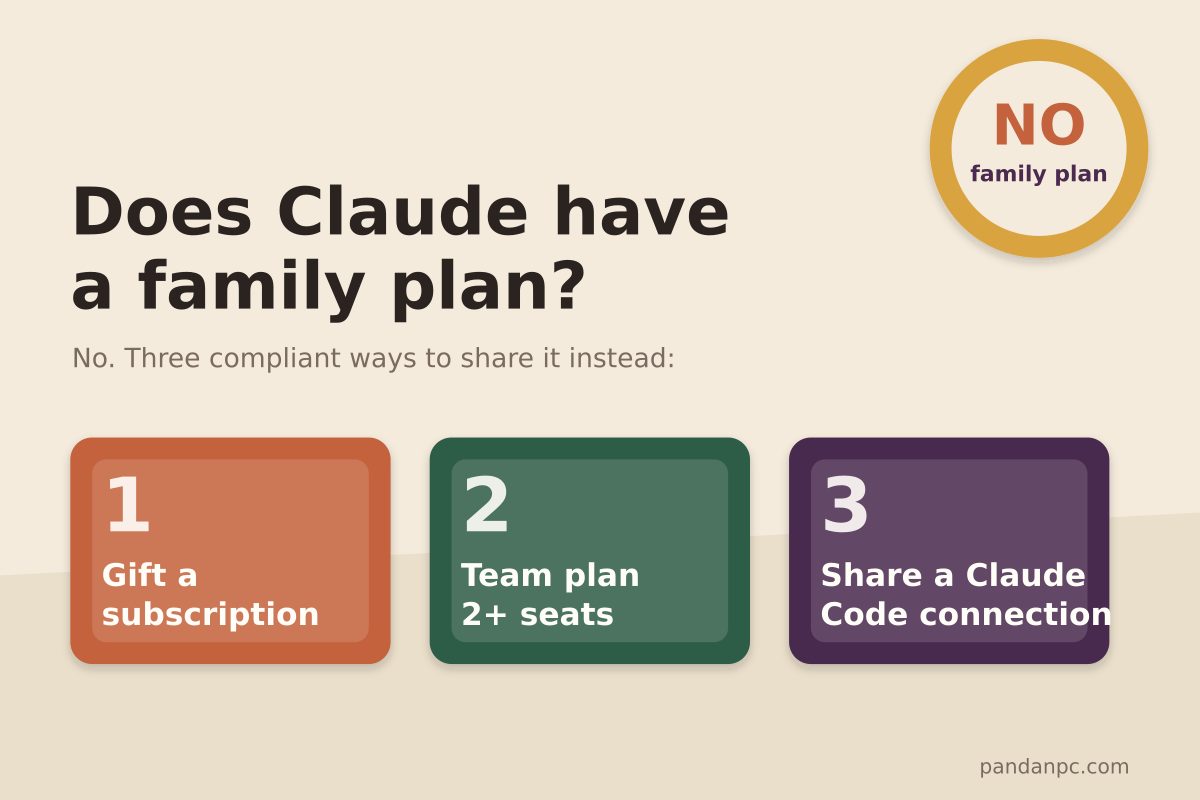
Quick answer: Claude does not have a family plan. As of September 4, 2026, claude.com/pricing lists only Free, Pro, Max, Team, and Enterprise—there is no "family" anywhere. Anthropic's Help Center also has no family sharing documentation.
If you want family, a partner, or two or three friends to use Claude together, there are only three paths that stay on the right side of the terms: gift a subscription, get 2 seats on a Team plan, or share the Claude Code connection on your machine instead of sharing an account. These three paths differ completely in price, restrictions, and use cases. This article checks each one against official sources and ends with a table to help you choose by scenario.
This article is for: people searching for "claude family plan" and finding it does not exist; small teams calculating how much more Team costs than Pro; and people already sharing one account with family who want to know how risky that is.
Does Claude have a family plan?
No. The official pricing page splits options into "Individuals" and "Teams & Enterprises." Under Individuals there are only Free, Pro, Max 5x, and Max 20x, all priced per single-person account. The Help Center's "Choose a Claude plan" also lists only those four tiers, then points "organizations or companies" to the Team and Enterprise pages.
Like ChatGPT, Claude does not offer a family sharing plan in the style of Spotify or YouTube Premium. Third-party articles you get from searching "does claude have a family plan" or "is there a claude family plan" all conclude "no"—and that matches the official pages.
So only two questions remain: can the Team plan be used as a family plan, and if you don't use Team, how can you compliantly share Claude?
Claude Team plan pricing and seat rules
The Team plan is the only official offering for "multiple people paying together and managing together." The figures below are from the official pricing page and the Help Center's "What is the Team plan," viewed September 4, 2026.
| Item | Standard seat | Premium seat |
|---|---|---|
| Annual price | $20 per seat/month | $100 per seat/month |
| Monthly price | $25 per seat/month | $125 per seat/month |
| Usage (official description) | 1.25x Pro usage per 5-hour window | 6.25x Pro usage per 5-hour window |
| Claude Code | Included | Included, with higher usage |
| Seat count | Minimum 2 seats, maximum 150 seats (more requires Enterprise) | Can be mixed with Standard seats |
A few rules where people often trip up:
- Usage is counted per seat, not as a shared team pool. The official wording is "usage limits are per-member, rather than applied to the team as a whole." Buying 2 Standard seats does not mean two people share 2.5x Pro's quota; each person gets 1.25x.
- Premium seats are for heavy Claude Code users. Standard seats also include Claude Code, but the quota is close to Pro's. If someone runs Claude Code all day, a Standard seat will quickly hit the weekly cap.
- Adding seats is prorated immediately; removing seats waits for the next billing cycle. The Help Center's "Purchase and manage seats on Team plans" says removing seats "takes effect at your next renewal" and offers "no prorated refund."
- When quota runs out, you can enable prepaid usage credits. Once an admin turns this on in organization settings, members can keep going beyond the seat quota and pay per usage.
If you try to use Team as a family plan, the math is: 2 Standard seats billed annually is $40/month, $6 more than two Pro annual subscriptions ($34/month). The extra buys an admin console, 1.25x quota per seat, and an organization identity. Two Premium seats cost $200/month—the same as two Max 5x plans—but with slightly more quota than Max 5x (6.25x vs. 5x).
Do you need a business email to start a Team plan?
Yes, and this is the biggest obstacle to using Team as a family plan. The Help Center's "Get started with the Team plan" says:
- The account that creates the organization needs a business email.
- All members' email addresses must be in the organization's allowed email domains. Admins can add domains, but public mail providers such as Gmail and Outlook are not in the default allowed set.
- The Team plan is "not intended for individual use"; its official positioning is for teams and organizations.
In practice: if you have your own domain mailbox (for example, one tied to a personal website), you can technically create an organization and add family members' addresses to the allowed domains. But that does not match the official positioning, so you have no protection if a review or complaint arises. This article does not recommend using the Team plan as a family plan; it fits teams of 2 to 150 people that have a unified email domain.
How to choose between Pro, Max, Team, and Enterprise
This is the table people most want to see when searching "claude pro vs team" or "claude team vs enterprise." Prices are from the official pricing page as of September 4, 2026.
| Plan | Price | Who pays / who manages | Usage | Best for |
|---|---|---|---|---|
| Pro | $20/month (annual equivalent $17/month) | Individual | Standard | One person's everyday use, including Claude Code |
| Max 5x | $100/month | Individual | 5x Pro | One person using Claude Code heavily |
| Max 20x | $200/month | Individual | 20x Pro | Someone running Agent tasks all day |
| Team Standard seat | $20 or $25 per seat/month | Organization admin | 1.25x Pro | Teams of 2–150 that need an admin console and SSO |
| Team Premium seat | $100 or $125 per seat/month | Organization admin | 6.25x Pro | Heavy developers on a team |
| Enterprise | From $20 per seat, plus usage at API rates, billed annually | Organization admin | Pay per usage | Teams needing SCIM, audit logs, compliance API, or custom data retention |
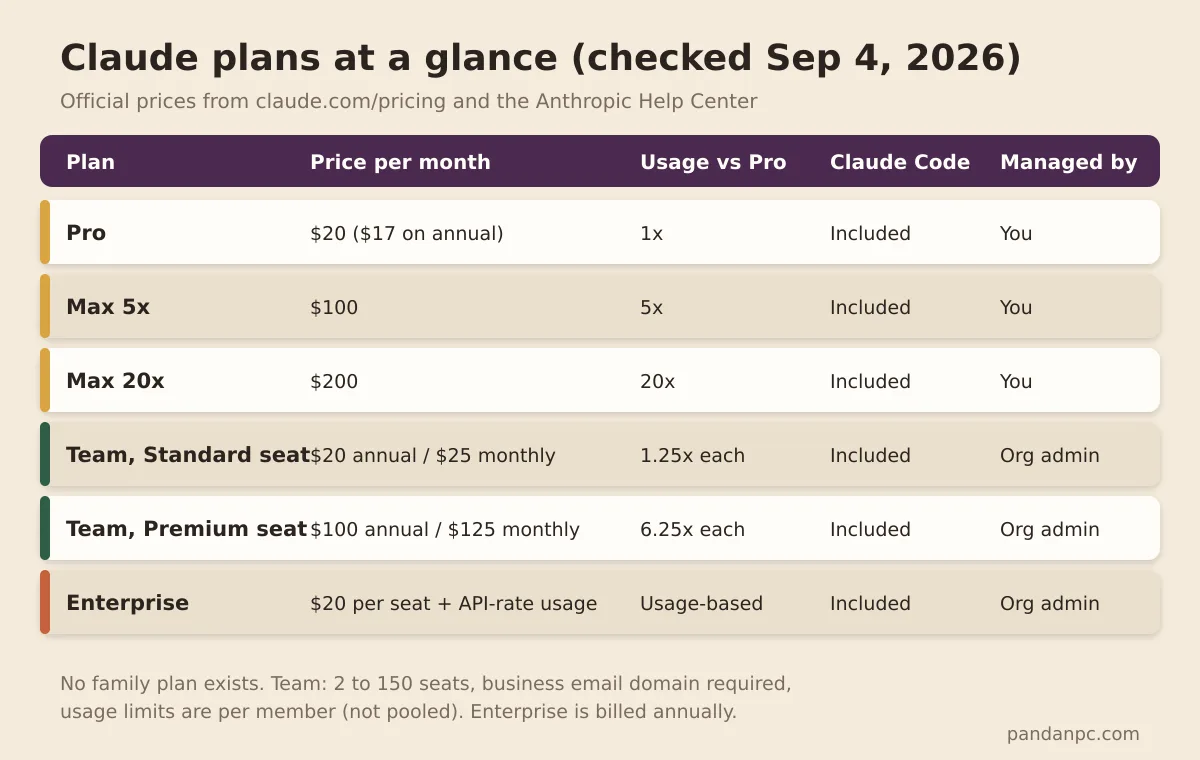
Three common judgments:
- One heavy user gets better value from Max than from a Team Premium seat. At the same $100, Max 5x does not require finding 2 seats, nor does it require a business email.
- For two or three developers sharing, Team gives separate accounts and an admin console, but every person must pay a seat fee. If you want to save money, see "Sharing a Claude Code connection" below.
- The line between Team and Enterprise is compliance, not headcount. A team under 150 seats but needing SCIM, audit logs, or HIPAA options still has to go Enterprise.
Why sharing one Claude account directly is not OK
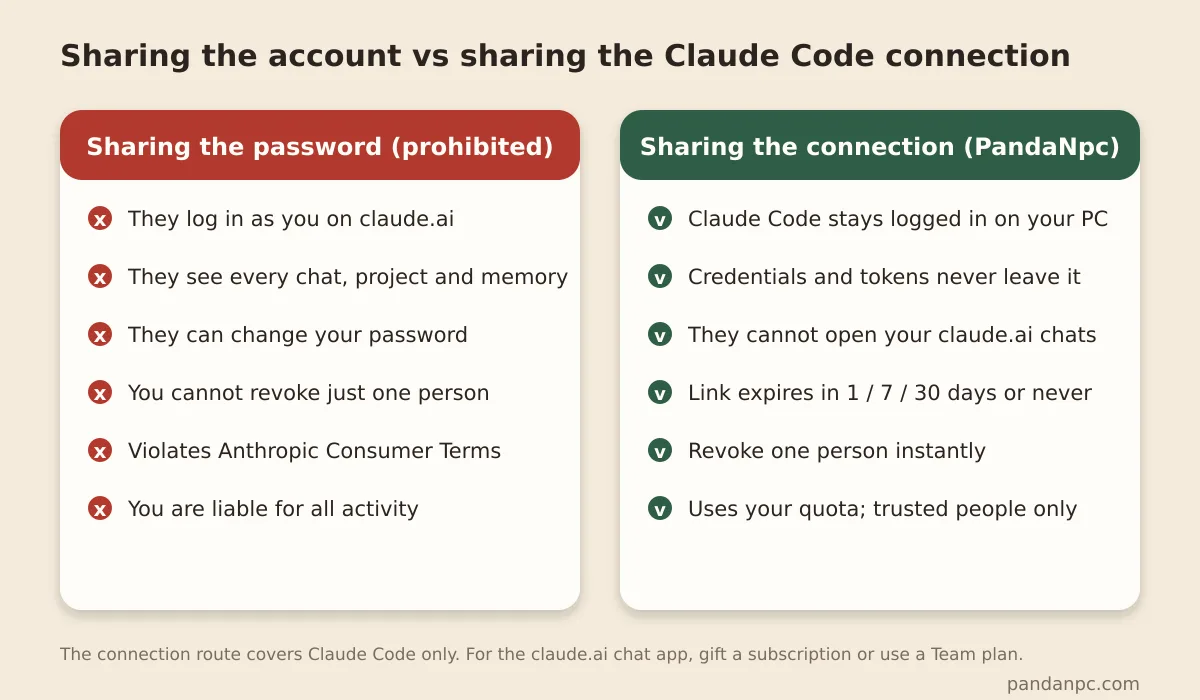
Many people's first instinct is, "I'll just give my family the password." The problem is not technical—it is the terms.
Anthropic's Consumer Terms (version effective October 8, 2025), Section 2:
You may not share your Account login information, Anthropic API key, or Account credentials with anyone else. You also may not make your Account available to anyone else.
In other words, sharing your password and making your account available to someone else are both explicitly prohibited. And "You are responsible for all activity occurring under your Account"—every action under the account is your responsibility. The real risks come in three layers:
- Ban risk. Simultaneous logins from two locations or unusual behavior patterns can trigger review, and the person banned is the one paying.
- Privacy and security. The other person can see all your conversations, projects, and memory. They can change your password and lock you out.
- You cannot revoke access from just one person. To revoke, you have to change the password and kick everyone out.
Anthropic's usage policy, updated February 2026, additionally says that OAuth sign-in for Free, Pro, and Max accounts is only for Claude Code and Claude.ai. You may not take those subscription credentials into third-party tools or services and relay them for others to use. Any plan that "lends your account token to someone else" is outside that line.
3 compliant ways to share Claude with family and friends
Method 1: Gift a Claude subscription
The simplest official option, and the closest to a "family plan" experience. According to the Help Center's "How to gift a Claude subscription":
- You can gift Pro, Max 5x, or Max 20x for 1, 3, 6, or 12 months.
- The buyer must be a Pro or Max user. Free users and Team or Enterprise members cannot currently buy gifts.
- Available worldwide. The recipient does not need an existing Claude account and does not need a credit card to redeem. Redemption happens at claude.ai/gift/redeem.
- Gifts must be redeemed within 365 days of purchase. The same person cannot stack multiple gifts, and cannot redeem while an existing mobile subscription is still active.
Gift pricing is based on the selected plan and duration; the purchase page shows the total, so this article does not quote third-party numbers. In essence, this path is "one person pays for two subscriptions"—but each person gets an independent account, independent quota, and independent privacy, with no terms worries.
Method 2: Get 2 seats on a Team plan
The prerequisites were covered above: you need a business email and a unified allowed domain. The kind of "family" where Team genuinely fits is really a couple running a startup or a family studio—situations that already have company email. In that case, 2 Standard seats at $40–50/month buys:
- Separate accounts, so you can't see each other's conversations;
- An admin who can remove members at any time and control spending;
- Claude Code for each person, with quota slightly above Pro.
If you don't have a domain mailbox, don't register one just for the Team plan. The benefit is not worth it.
Method 3: Share a Claude Code connection, not your account
This path addresses the most common real need: one person subscribes to Max and wants friends or colleagues to also run Claude Code, but those people don't need the claude.ai chat interface.
The idea is to separate the "account" from the "connection": Claude Code stays logged in only on your own machine, and credentials never leave your computer. You use PandaNpc to share the Claude Code connection on that machine. The other person, from their own PandaNpc account, remotely operates the Claude Code on your machine and consumes your subscription quota. Here's how:
- Install PandaPaw on a development machine and sign in to PandaNpc, then attach that machine's Claude Code on the Agent page.
- Generate a share link for the connection, choosing 1 day, 7 days, 30 days, or permanent validity.
- The other person opens the link, adds the connection to their own Agent list, and starts using it.
- To take it back, click revoke; the other person disconnects immediately and your own connection is unaffected.
The boundaries between this method and the previous two need to be clear:
- What the other person receives is permission to remotely operate the Claude Code on your machine, not your account. They cannot open your claude.ai conversations, and they cannot obtain your password or tokens.
- It still consumes your account's quota, so the weekly caps on Max 5x and Max 20x still apply. You are responsible for all activity under your account, so only share with people you trust.
- It solves "running Claude Code together," not "using Claude's web chat together." The latter only works through gifting or Team.
For the full setup steps, revocation, and expiry settings, see Can Claude subscriptions be shared? How to safely share Claude Code with friends and teams. If what you are sharing is access to GPT-6 Astra, the approach is the same: see How to share GPT-6 Astra with family and friends.
Choose by scenario: a table that makes it clear
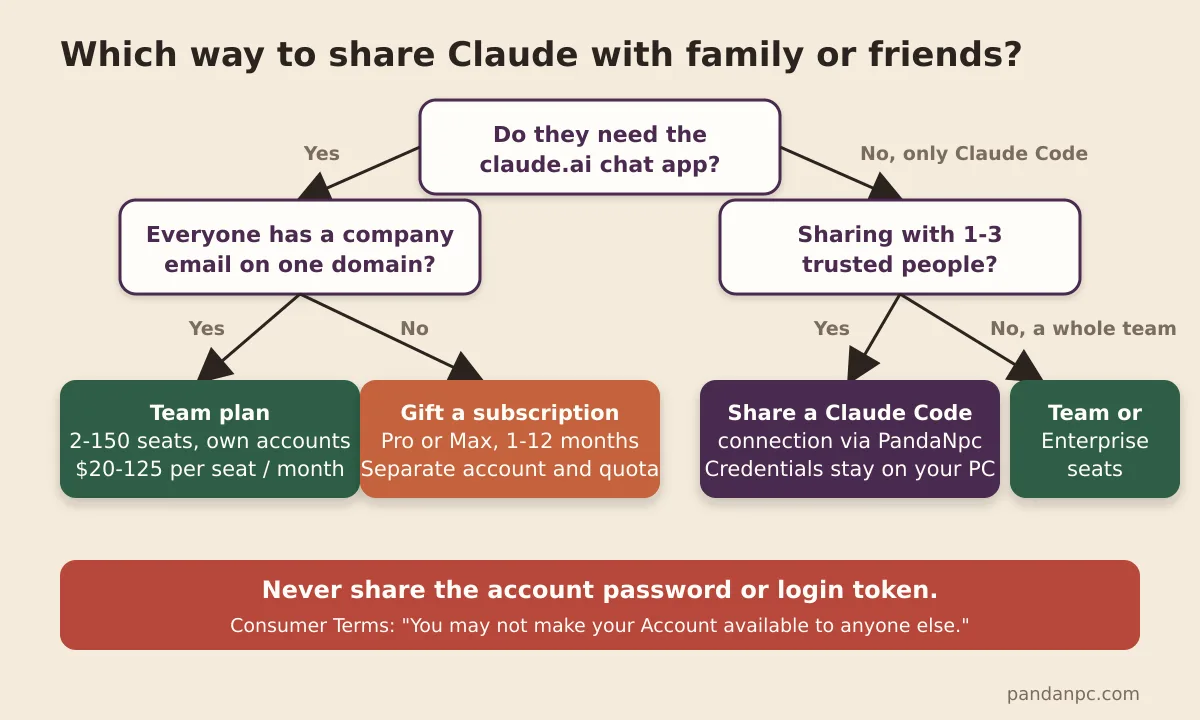
| Your situation | Recommendation | Approximate monthly cost | Why other options are not recommended |
|---|---|---|---|
| A couple or family members each occasionally chat with Claude | Two Pro plans, or one Pro user gifts Pro to the other | $34–40 | Team requires a business email; sharing a connection does not include web chat |
| One person codes heavily, the other uses occasionally | You take Max 5x and gift Pro to the other person | $120 | Two Max plans are too expensive |
| Two or three developers want to share one Claude Code setup | One person takes Max and shares the Claude Code connection via PandaNpc | $100–200 | Team charges every person a seat fee; sharing passwords violates the terms |
| A 2–10 person team with company email | Team plan, with Premium seats for heavy developers | $20–125 per person | Individual plans have no admin console or SSO |
| Needs audit, SCIM, compliance API | Enterprise | Per seat plus usage | Team does not have these features |
FAQ
Does Claude have a family plan?
No. As of September 2026, the official pricing page lists only Free, Pro, Max, Team, and Enterprise. There is no family or family sharing plan.
What is the minimum number of seats for a Claude Team plan?
A minimum of 2 seats, up to 150 seats. Above that, you need to upgrade to Enterprise.
What is the difference between Claude premium seats and standard seats?
Both include Claude Code. Premium seats get 6.25x Pro usage; standard seats get 1.25x. Annual prices are $100/month and $20/month respectively.
Can I start a Claude Team plan with Gmail?
Creating an organization requires a business email, and members' addresses must be within the organization's allowed domains. Public email domains are not allowed by default.
Can I lend my Claude Max account to family members?
No. The Consumer Terms explicitly prohibit sharing account credentials or making your account available to someone else. To let family use Claude, gift a subscription. To let someone else run your Claude Code, share a connection rather than an account.
Can gifted Claude subscriptions be stacked?
No. The same recipient cannot redeem multiple gifts at the same time, and gifts are valid for 365 days from purchase.
Conclusion
Claude has no family plan. The Team plan is for teams with a business email domain, and directly sharing an account violates the terms. To use Claude with family and friends, choose by need: if you want web chat, gift a subscription or buy Pro for each person; if you want to run Claude Code together, share a connection rather than an account. Prices and rules are subject to the official pages. The data in this article was verified on September 4, 2026.
Sources
- Claude official pricing page (viewed 2026-09-04)
- What is the Team plan? — Anthropic Help Center
- Get started with the Team plan — Anthropic Help Center
- Purchase and manage seats on Team plans — Anthropic Help Center
- Use Claude Code with your Team or Enterprise plan — Anthropic Help Center
- How to gift a Claude subscription — Anthropic Help Center
- Anthropic Consumer Terms of Service (effective 2025-10-08)
Related guides

Can you share a Claude subscription? How to safely share Claude Code with friends and team (no password, revoke anytime)
Yes — and you don’t need to hand your account password to anyone. PandaNpc lets you share the Claude Code connection on your machine via a link with friends, family, or teammates: they remotely use your subscription quota to run Claude Code. Each share is an independent, revocable token with 1/7/30-day or permanent validity; one-click revocation disconnects them instantly, without affecting your own usage at all.
Read article →
Is GPT-6 Astra Available Now? How to Safely Share It with Family and Friends
Yes — GPT-6 Astra is now fully available to eligible paid plans, Codex, and the API. This article explains the permission differences among Plus, Pro, Business, Enterprise, Free/Go, and GPT-6 Pro, and demonstrates how to securely share via revocable Agent connections without sharing OpenAI account passwords or API Keys.
Read article →
How to Use Claude Code Remote Control from Your Phone (2026)
Use Claude Code Remote Control from your phone or browser. Learn the three official commands, setup limits, troubleshooting, and when PandaNpc fits.
Read article →